Users can now browse and select existing tags and collections when creating new tag or collection settings. This makes setup faster, easier, and less error-prone.
July 1st, 2026
New
PreOrder Now
Write a comment...
May 28th, 2026
New
Kiwi Size Chart & Recommender
Merchants on paid plans can now use product metafields as matching conditions in Kiwi. This makes it easier to create more precise rules based on custom product data, like “material: cotton,” “season: summer,” or “launch_date: 2026-01-01.”
Write a comment...
April 16th, 2026
New
Evey Events & Tickets
You can now enable a group check-in setting that allows the Check-in app to check in all attendees from the same order with a single scan or lookup.
Write a comment...
April 16th, 2026
New
Evey Events & Tickets
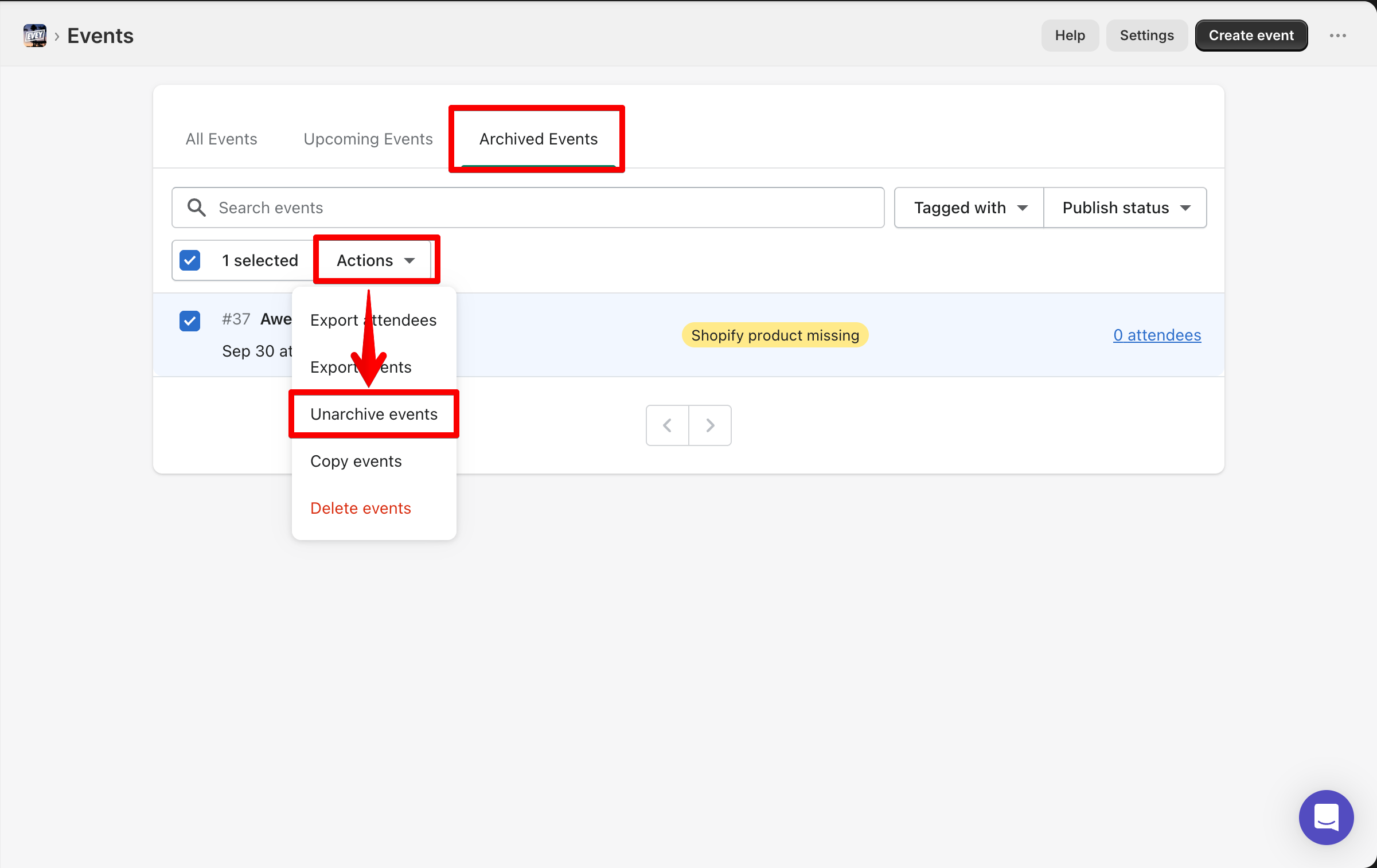
You can now unarchive previously archived events in bulk directly from your Evey dashboard.
Select multiple events and restore them in just a few clicks, making event management more efficient as you work.
Write a comment...
March 5th, 2026
Improved
Evey Events & Tickets
We have consolidated multiple back button variations in the Notification Customization section into a single, consistent style. This update aligns the navigation UI with the established design patterns in Vendor Portal 2.0, improving visual consistency and creating a more predictable user experience.
Write a comment...
March 5th, 2026
Improved
Evey Events & Tickets
We’ve added “View on storefront” to the “More” dropdown in Event settings, ensuring the “More” dropdown and Save button behavior remain consistent with the current interface for a familiar and seamless user experience.
Write a comment...
February 27th, 2026
Improved
Kiwi Size Chart & Recommender
After reviewing the most popular themes used by Kiwi customers, we added support for the Prestige and Impulse themes to allow merchants to place the size chart next to the Size header.
Write a comment...
February 12th, 2026
New
Evey Events & Tickets
We’ve launched a new bulk copy feature in Evey Events & Tickets to make event management faster and more efficient.
You can now copy one or multiple events directly from the dashboard using “Actions” → “Duplicate.” A confirmation pop-up will appear, allowing you to review the number of events being copied and choose whether to enable “Create products as draft.”
All copied events retain the same tickets, pricing, descriptions, images, and settings, helping you launch events faster while keeping your setup consistent.
For more details, check our guide: How to Duplicate Events
Write a comment...
January 7th, 2026
Improved
Kiwi Size Chart & Recommender
If you don’t have any size charts yet, clicking "Create Size Chart" will now show the template/import modal, rather than auto-generating a blank chart. This makes getting started easier and less overwhelming.
Write a comment...
January 7th, 2026
Improved
Kiwi Size Chart & Recommender
When selecting "Apply to Products" or "Size Recommender" sections, the editor will now auto-close to avoid clutter and confusion.
The old "Advanced Mode" toggle is now a select field for clearer mode switching.
We’ve also removed the tooltip for Advanced Mode to reduce distractions.
Write a comment...